
image via Pixabay
Overview
A few days ago, I gave an internal tech talk to my team on best practices for architecture design. I condensed these practices into a 20-character mantra:
- Architecture looks at the problem
- Requirements look at use cases
- Design looks at the model
- Details look at the sequence
I shared this mantra on Twitter, and many friends showed strong interest and wanted to go deeper. So I expanded the ideas from that talk into this article.
Architecture Design and System Analysis
Let’s first clarify what architecture design and system analysis are (the latter often shortened to “system analysis”). Some of you are familiar with the first but not the second. No worries—here’s how Wikipedia introduces them:
Architecture: Software architecture is an abstract description of the overall structure and components of software, used to guide the design of various aspects of large software systems.
System analysis aims to study the interactions between parts (subsystems) in a given system structure, the system’s external interfaces and boundaries, and the behavior, functions, and limitations of the system as a whole, so as to provide reference and basis for future changes and related decisions.
The English definitions may make it clearer:
- Architecture = Software Architecture (design) = Software architecture - Wikipedia
- System analysis = Systems analysis - Wikipedia + Systems design - Wikipedia
What we sometimes call “design docs” may cover the whole design process: architecture design, system analysis, and other design activities (communication, PoC, etc.).
Software Architecture (design) = Software Architecture
- Define and implement the basic structure and organization of software systems
- At the business level: clarify the problem, define concepts, present value
- At the technical level: choose foundational frameworks, turn uncertainty into certainty
- At the engineering level: identify boundaries, split modules, improve development efficiency
System Analysis = System Analysis
- The process of analyzing and studying business needs and problems
- At the business level: requirement gathering, requirement analysis
- At the technical level: modeling, flowcharts, data flow diagrams, interface design
- At the engineering level: implementing requirements within applications and system frameworks
Finally, how I see the boundary between the two: I believe there is no sharp line between architecture design and system analysis. Any system or module will go through system analysis. You start thinking in terms of architecture when:
- More than three teams are collaborating, because that involves interests and boundaries.
- You begin to introduce uncertainty, whether actively or passively.
- You are making trade-offs: what to do first, what to do next.
- The system is so complex that it’s hard to reach consensus and explanation cost rises.
- You can provide information others don’t have.
What Is Architecture
Here we focus on technical architecture, not business or product architecture. The emphasis is how to use technical capabilities and methods more efficiently to solve a certain type of problem.
Technical architecture can be split in two: one is top-down—business, strategy, and framework division; the other is focused on engineering and implementation (coding).
Experienced people often have a more macro view. Common terms include: global, macro, domain, strategy, balance, planning. I turned these into a word cloud:

generated by https://tendcode.com/tool/word-cloud/
These concepts matter a lot in architecture design and system analysis, because they help us think about the whole picture and even beyond technology—from business value, commercial strategy, and business strategy.
The other kind of architecture is more about engineering design and implementation. Typical keywords: domain modeling, UML, GoF 23, SOLID, high cohesion and low coupling, etc. Word cloud:

generated by https://tendcode.com/tool/word-cloud/
Architecture is a broad topic. This article picks one angle: making architectural thinking useful in day-to-day work through practice and methodology, to cover about 80% of engineering design and development scenarios. I call this “architecture design the easy way.”
Minimalist Architecture Design — Architecture Looks at the Problem
The first and most important step in understanding architecture is to focus on the problem: what problem are you facing, and how will you solve it?
Usually, if our business and systems run stably and we don’t run into problems, we don’t need much architecture design. But whenever we do architecture design, it’s because we have a problem. The problem may come from new requirements, changes in the environment, or the system’s own evolution. Whatever the source, we have a problem.
After we have a problem, how do we solve it? Like “putting the elephant in the fridge,” we break it into steps.

image via unknown
So solving a problem has three steps: first describe the problem clearly, second negotiate and decide until there is agreement, third take action to solve it.

One more question that might sound silly: why can’t we just solve the problem directly?
Because problems are complex; there are many solution paths, and different options have different pros, cons, and costs. In architecture design we need to make these decisions.
Then why not just make the decision, or even start coding right away?
First, there may be authority issues—the architect may not have final say; someone with decision rights may need to sign off. Second, the architect may not be an expert in every area; designing a complex system often requires coordinating multiple parts and domain experts to evaluate and decide together.
Example
Take Prometheus’s architecture as an example.
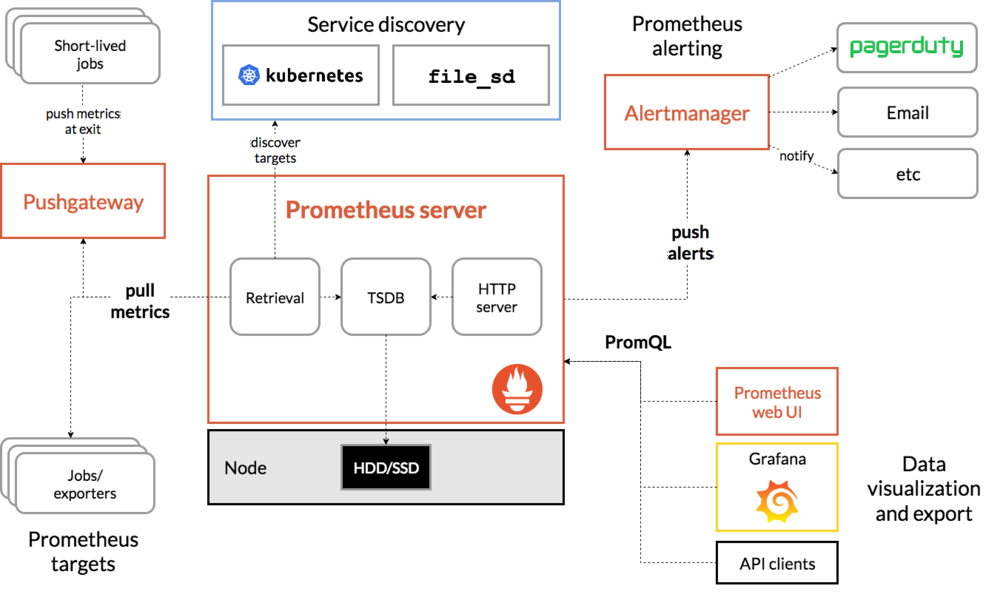
image via Prometheus
This diagram answers many questions. A few examples:
- Problem: Push or pull for data collection? What storage? How to design the alerting pipeline?
- Decisions: Pull (Pushgateway in a few cases); custom TSDB; Alertmanager to integrate with external systems
- ROI: Pull reduces observability cost on targets, no need for a push-based registry; no suitable external implementation at the time; Router/Sub alert mechanism for flexible integration
Summary
Problems drive architecture change; the architecture addresses the problem; architecture review aligns on the solution.
On who gets to decide: I strongly believe architects should form their own view based on domain knowledge, industry judgment, and understanding of the current situation. That thinking should be supported by cause and effect. A good architect must have a point of view.
One small add: why didn’t I mention architecture layers or module layers?
Not because layering and frameworks don’t matter—everyone is already professional there. Layering and modularity are basic common sense and skills, so they usually aren’t the focus of debate and decisions. If you can’t quickly agree on layers and frameworks, either the team composition is off or the problem is so complex it’s no longer in the 80% case.
Deliverables at this stage: architecture diagram and shared understanding of problem, value, cost, risk, and responsibilities.
Minimalist Architecture Design — Requirements Look at Use Cases
Requirements are the answer to the problem. I like to use mind maps or a blank sheet to draw and make requirements clear. What to draw? Clarify roles and list actions and behaviors.
What’s a good way to organize everything? I often use a subject–verb–object (and adjuncts) approach: who does what, in what scenario (optional), in what state (optional).

image via unknown
Use cases break requirements down clearly, and you keep communicating with the stakeholders in the process.
Demo scripts are the product manager’s weapon; requirement use cases are the engineer’s weapon.
Some junior engineers unconsciously become mere executors of requirements. I’d say engineers who don’t understand the business aren’t much different from outsourced labor. The requirement analysis phase is crucial—it’s the chance to understand, structure, and redesign the business input. By organizing use cases, we can push back on unrealistic or unreliable requirements.
This is one of the few phases where we can influence (and give feedback to) the requirement side; make the most of it.
Example
Here’s an example of a product use case:
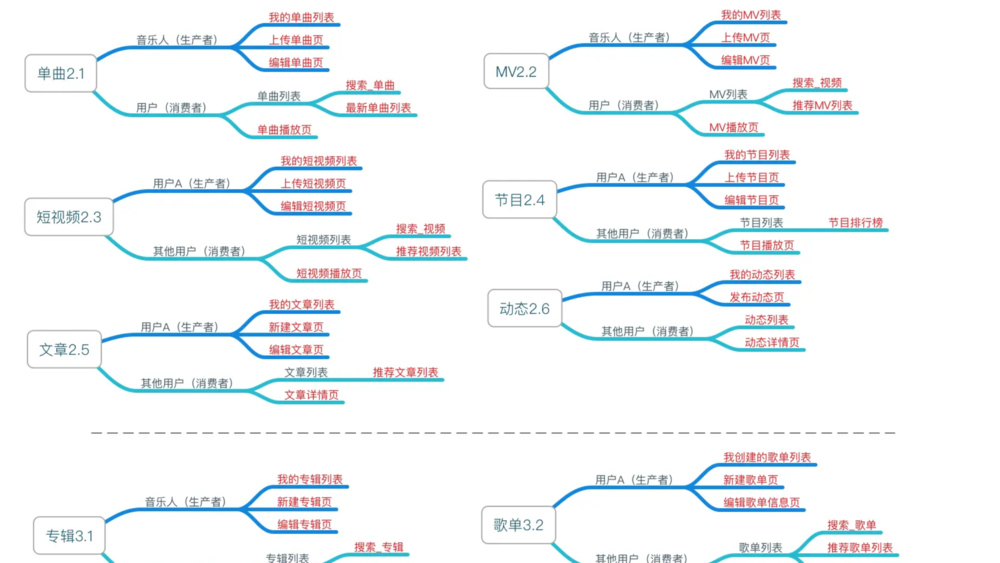
image via Netease Cloud Music product analysis
This use case was actually summarized by “the other side” 😄, but it still shows how important use cases are.
Summary
Besides subject–verb–object, other useful techniques:
- User journey (action path): imagine the path the user (or actor) takes to reach their goal
- Prioritize solving the 20% of issues on the core path
- Organize use cases by role, orthogonal split, etc.; assign use cases to modules
Deliverables: demo script, use case diagram.
Minimalist Architecture Design — Design Looks at the Model
To me, the core of design is the model: the model defines the carrier and boundaries of data. Data defines the components; boundaries define ownership and responsibility. In UML, many entities and objects are used to define model boundaries. As the business system grows in complexity, modeling faces greater challenges.
A few modeling principles I use:
- Define terms (in both languages if needed), meaning, and notes.
- Identify core models (focus on the critical 20%).
- Refine and abstract models.
- Make relationships between models explicit.
- Combine static and dynamic: a few models have behavior; focus on the functions they provide.
- Map business model ↔ data model.
Many people don’t care about a glossary, but I do. There’s an effect called “foreign language effect”—like using Latin/Greek in natural history to describe species. For non-native English engineers, using English for terms can help focus the discussion.
Always keep the 80/20 rule in mind, especially in design: focus on core objects and zoom in on them rather than getting lost in details. Usually, focusing on the core 20% of models is enough for most scenarios.
When refining and abstracting models, iterate carefully. You can connect this to earlier use case definition and later sequence design; it takes solid domain knowledge. I like to refer to external code and designs at this stage.
Relationships between models are mainly 1:1, 1:N, M:N. Use arrows to show primary vs. secondary clearly. Primary/secondary implies ownership and affects many downstream details (URLs, database, lifecycle, etc.). I recommend avoiding M:N when possible; it often indicates an intermediate credential or relationship/binding.
Besides static data, consider model behavior (only a few models have it). This stage can feed into the next step—detailed design.
After the business model, think about the data model. For typical business systems, this mapping is straightforward. Business systems are often stateless and rely on the database for storage. For data-intensive applications (DIA), you need to think about runtime data, lifecycle, and availability (if you have that need, you probably aren’t reading this far 😄).
Example
Kubernetes RBAC (Role-Based Access Control) is a common AuthZ (authorization) system (not AuthN—authentication).
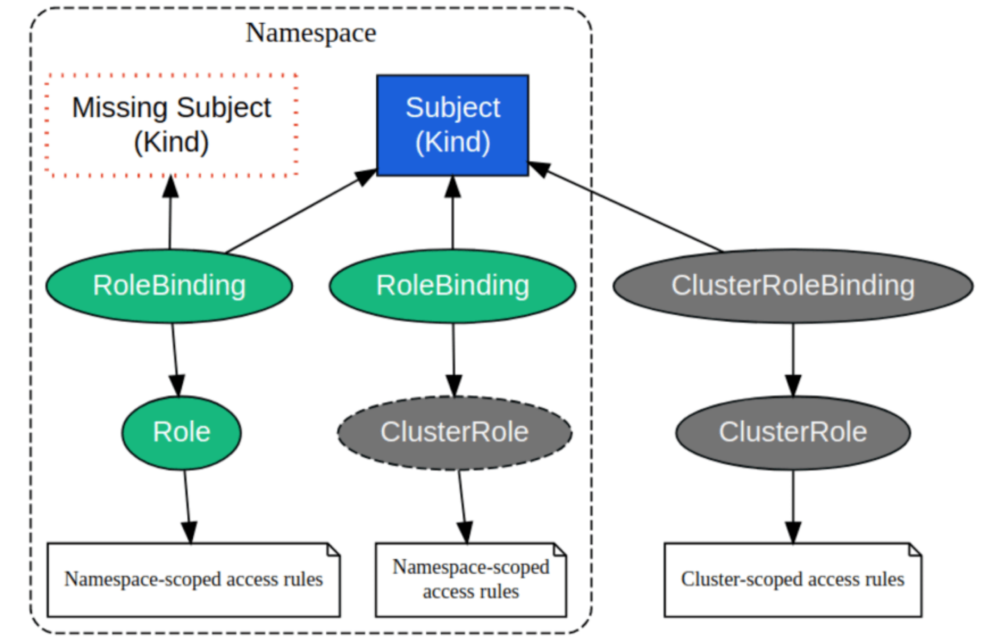
image via Kubernetes RBAC - DEV Community
A few questions to consider:
- Why both Role and ClusterRole? What’s their structure?
- Why not ACL? What’s the difference between ACL and RBAC?
- Why not Policy?
Modeling is what gives you these answers.
Models in Non-Business Systems
We’ve been focusing on business models—what users perceive and the product understands, usually stored in the DB.
In infrastructure, there are models too, sometimes called “concepts.” Infrastructure models are often simpler; business models can be very complex because the world is complex, while infrastructure focuses on narrow, vertical problems.
Infrastructure also leads to more abstract modeling—e.g. the often-overlooked Manager/Service pattern. Models with data and state, like Executor, are common; Registry and Queue are common too.
Kubernetes Concepts—dozens of subcategories and hundreds of concepts—show how complex such a system can be.
Summary
Models are not just data; they define boundaries, and boundaries determine ownership and responsibility.
Design models in both static and dynamic terms: statically what they hold, dynamically what they do.
In infrastructure, deliverables may include UML model diagram, ER diagram, DB DML, class files, OpenAPI/Swagger (partially), etc.
Minimalist Architecture Design — Details Look at the Sequence
Programming = Data structures + Algorithms + Control flow
Before turning design into code, the last important step is nailing the details. For stakeholders and decision makers this step may not matter much, but for the implementers (the dev team) it directly affects delivery quality and timeline.
I think details should be captured in sequence diagrams.
We often use two kinds of diagrams for details: flowcharts and sequence diagrams. They have a lot in common, but I prefer sequence diagrams because they show order and make the boundaries and interactions between systems clear.
My rule of thumb: one sequence diagram per use case.
Example
Example from an official AWS blog:
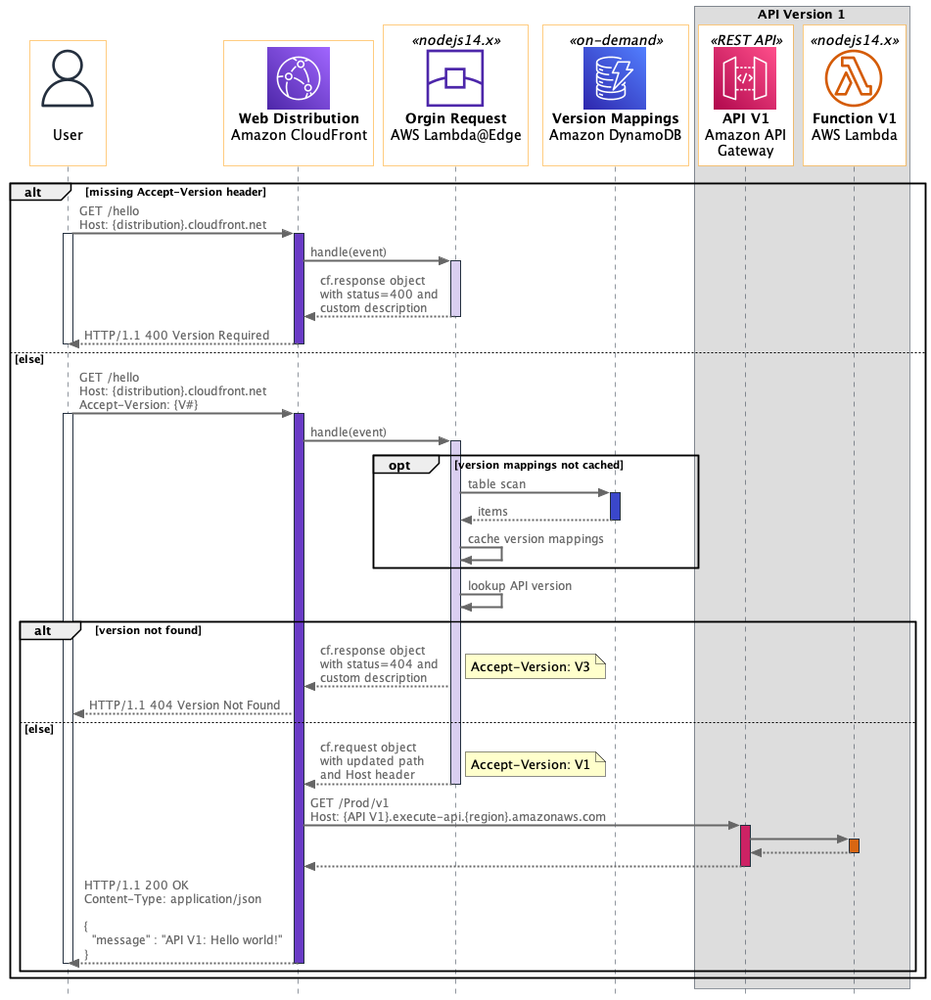
The diagram shows a sequence for using CloudFront in AWS: how requests flow across systems and how various error cases are handled.
Summary
A few tips for sequence diagrams:
- User action is the trigger
- System boundaries must be clear
- Request and response = synchronous
- Request without response = asynchronous
Usually, once the sequence diagram is solid, you can hand off to the team with confidence. Without it, you rely entirely on collaboration and trust.
Deliverables: sequence diagram, API docs (OpenAPI/Swagger), frontend service generation (if applicable).
Minimalist Architecture Design — Wrap-up
By this point we haven’t written code yet, but we know what to do and what it will look like. We have class structure, API definitions, frontend service generation, etc. Multiple teams can work in parallel without obvious bottlenecks.
- ✅ Problem defined
- ✅ Approach chosen
- ✅ Class structure, API definitions
- ✅ Server-side code generation
- ✅ Flow agreed
- ✅ About 1/3 of reporting material
- ✅ About 1/2 of tech talk material
If you need to report later, you already have about one third of the content. If you need to write a tech talk, you have about half.
If the project is a simple CRUD app, there usually aren’t many hard parts.
If it’s a data-intensive application (DIA), you need to design and implement storage and think about consistency and concurrency. For a complex system, you also need to check for uncertainty at the boundaries between systems. If you have sync challenges (e.g. framework changes, communication layer changes), de-risk early. (I don’t think doing tech upgrades and feature development in parallel is wise.)
Extra — Drawing Tools
I have my own set of drawing tools for architecture diagrams, flowcharts, etc. P.S. I even design logos for my products—maybe I’ve always wanted to be a designer 🙂
As an engineer, you should build your own drawing UI kit, get good at it, and put together a toolbox so you can turn ideas in your head into documents quickly.
My toolkit is fairly rich. For architecture diagrams:
- Block diagrams
- OmniGraffle (paid, complex, polished)
- Excalidraw (simple, casual)
- Deployment diagrams
- Excalidraw
- Mind maps
- SimpleMind (paid)
- XMind (paid)
For engineering design (UML):
- Use cases
- Yuque drawing
- PlantUML (Yuque can render it)
- Sequence diagrams
- PlantUML
- State diagrams
- Yuque
- ER diagrams
- Excalidraw
- Gantt charts
- PlantUML
Shameless plug: I maintain Excalidraw (Fork), with Chinese handwriting fonts and consistent style.
Extra — the Hard Way
We started from a simple, practical architecture design flow. If you’re the curious type, that may not be enough—there’s still the 20% of complex cases. Here are some keywords and book recommendations to go deeper:
- Principles
- Philosophy
- Ideas
- Laws
- Methodology
- Case studies
Some books that help:
- Business architecture
- Technical architecture
Link: Architecture Design the Easy Way | Log4D
3a1ff193cee606bd1e2ea554a16353ee